
Built for Multitasking Developers.

IDE. Terminal. Browser. All visible. No alt-tab.
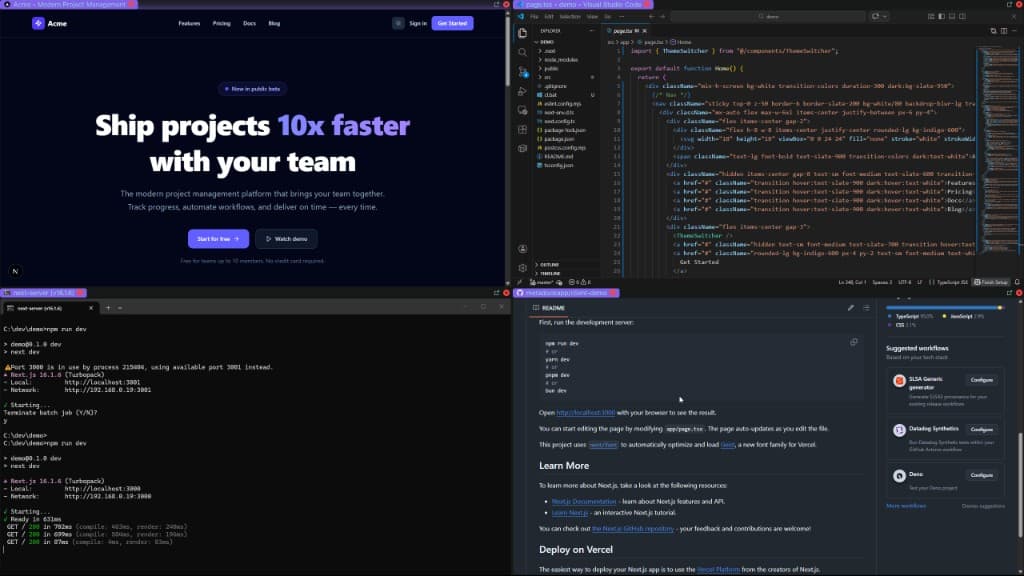
FastMulti-MonitorZero Clutter
LightweightFastSecure
MetaDock
VS Code, terminal, browser, and DevTools side by side
IDE
Terminal
Browser
Aligned
IDE
main.tsx
VS Code / Cursor
TERMINAL
pnpm dev
BROWSER
localhost:3000
IDE, Terminal, BrowserOne screen. No alt-tab.
Save once. Restore every boot.
Quick setupMulti-monitorLocal only

See it in action

IDE. Terminal. Browser. All aligned.

Developer setup: IDE, terminal, browser in one layout
IDE
Terminal
Browser

Before vs After

Before

  • Alt-tab between IDE, terminal, browser
  • Reopen windows every reboot
  • Manually resize and align

After

  • One click. All visible.
  • Same layout. Every boot.
  • Drag borders. Layouts adapt.

No friction. Just flow.

Capabilities

What you get

Efficient debugging layouts

Editor, browser, DevTools. All visible. No switching.

Multi-monitor dev setups

Code left. Preview right. Terminal below.

Instant resizing

Drag borders. Layouts adapt. Your workflow.

Context switching without friction

Save layout. Restore. Same setup every time.

Precise. Technical. No fluff.

Lightweight. Local only. Flat pricing.

QuickSetup. Save once. Restore every time.

Lightweight

No lag. Runs alongside your IDE.

Instant restore

Reboot? One click. Same layout.

Local only

Your data stays on your machine.

Why MetaDock for developers

Code, browser, terminal visible together. One glance.
Save once. Restore in one click. Every boot.
Works with VS Code, Cursor, Chrome. Use what you use.

Real users

What people are saying

So far this software has some excellent features and a promising future. The ability to have a highly custom interface, completely detached from windows explorer.exe, gives this software a wide range of application.

Software Developer37 hrs

Brilliant software. Main use case for me is the ability to resize windows that can't usually be resized. I'm able to do almost as much on 2 monitors now as I could on 3.

Developer37 hrs

I don't understand how this software is free. This tool is amazing! Great job developer!

Developer265 hrs

FAQ

For developers

Developers

REST API, Selenium, MCP. All plans.

Free
MetaDock Explorer
1 profile. No workspaces. Free forever.
Free
  • 1 browser profile
  • Auto-tiling & multi-monitor
  • No workspaces or multi-profile support
  • No privacy modes or auto-refresh
  • No API, MCP, or automation access
MetaDock
50 profiles, 3 layouts, unlimited workspaces. All features.
$29/mo
  • 50 browser profiles
  • 3 layouts per workspace
  • Unlimited workspaces
  • All features (privacy modes, auto-refresh, live info bar, symbol manager, multi-monitor)
  • 10,000 API calls/month (no daily cap)
  • 14-day money-back guarantee
Most Popular
MetaDock Pro
Unlimited profiles, layouts, workspaces.
$59/mo
  • Unlimited profiles, layouts, workspaces
  • Unlimited API calls (no daily cap)
  • Everything in MetaDock included
  • 14-day money-back guarantee
Free plan available
14-day money-back guarantee
Cancel anytime

Windows 10/11 only. macOS coming soon.

Team
Need multiple seats or custom deployment? Let's talk.

Your IDE, browser, terminal. One screen.

14-day money-back guarantee. Quick setup. Windows 10/11.

Get Started
Windows 10/11