
Multi-Account Workspace for Windows

Manage Every Platform Without the Mess.

10 clients. Zero logouts. One click to switch.
FastMulti-MonitorZero Clutter
LightweightFastLocal-first
MetaDock
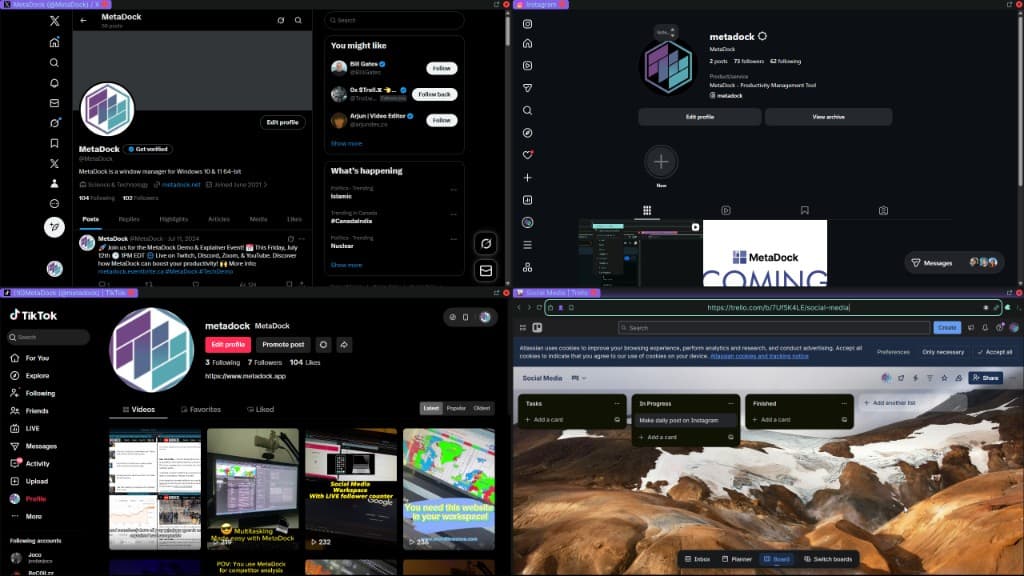
Multiple social dashboards side by side
5 Automation ProtocolsLocal-First DataNo Cloud Sync
Before
Before: cluttered workspace
After
After: organized MetaDock workspace

Every client. Every platform. All at once.

Workspace 1
MetaDock
github.com
dev-ops-lead
United States198.51.100.14
github.com
client-acme
Germany203.0.113.72
amazon.co.jp
buyer-tokyo
Japan100.24.58.191
stripe.com
finance-uk
United Kingdom51.142.89.203
github.com
qa-staging
Canada142.93.12.88
stripe.com
billing-eu
France91.134.200.15
amazon.com
seller-central
United States44.208.55.6
cloudflare.com
infra-apac
Singapore103.6.84.210
Profile Isolation
Color-Coded Clients
One-Click Restore

Capabilities

What you get

Scheduling tools

Buffer, Hootsuite—visible alongside content.

Analytics dashboards

Per-platform metrics. Side by side.

Client accounts

Per-client workspaces. One click to switch.

Campaign tracking

Multiple campaigns. No logout. All visible.

Content planning layouts

Color-coded. Obvious which is which.

The logout-login cycle never ends.

Logging out of Instagram to check a different client's TikTok.

Posting to the wrong client's profile because tabs got mixed up.

Incognito window chaos just to manage two accounts at once.

Wasting the first hour of every day just switching between clients.

Why MetaDock

MetaDock
Chrome profiles
Account switching
All visible at once
Switch profiles manually
Client isolation
Color-coded profiles
Easy to mix up
After a restart
One-click restore
Reopen everything
Number of accounts
Up to 50 profiles
A few profiles
Workspace templates
Per-client workspaces
Manual each time

Steam reviews

What people are saying

I often open multiple browsers just to access different accounts for my business. I'm able to keep everything in one browser AND it remembers the order. It's really making a difference in how productive I am.

Steam user1,519 hrs

This app is one of the best tools you can use if you're a multi-tasker. I trade, I code, and I do design work. Using my own browser gives me the flexibility to create and manage my own workspaces.

Steam user20 hrs

Used it for multitasking across social engagements on Youtube, Twitch, Facebook, Discord, and X/Twitter.

Steam user87 hrs

Social Media Managers

Multi-account. No logout. Scale when needed.

Free
MetaDock Explorer
Try MetaDock with 1 profile. Free.
Free
  • 1 isolated browser profile
  • Auto-tiling grid layout
  • Browser extensions support
  • Upgrade anytime for workspaces, multi-profile, API, and more
MetaDock
50 profiles, 3 layouts, unlimited workspaces. All features.
$29/mo
  • 50 browser profiles (run 50 accounts at once)
  • 3 layouts per workspace (e.g. one per monitor)
  • Unlimited workspaces
  • All features (privacy modes, auto-refresh, live info bar, symbol manager, multi-monitor)
  • 10,000 API calls/month
  • 14-day money-back guarantee
Most Popular
MetaDock Pro
Unlimited profiles, layouts, workspaces.
$59/mo
  • Unlimited profiles, layouts, workspaces
  • Unlimited API calls
  • Everything in MetaDock included
  • 14-day money-back guarantee
Free plan available
14-day money-back guarantee
Cancel anytime

Windows 10/11 only. macOS coming soon.

Not sure what these features do? See the full breakdown →

Team
Need multiple seats or custom deployment? Let's talk.

14-day money-back guarantee

Try any plan risk-free. Full refund within 14 days if not satisfied.

Cancel anytime

No lock-in. Stop your subscription whenever you want.

Local-first data

Layouts, profiles, and browsing data stored locally. No cloud sync.

FAQ

For social media managers

10 clients. Zero logouts. One click.

14-day money-back guarantee. Professional plans. Windows 10/11.

Get Started
Windows 10/11