
Human-in-the-loop browser automation
Watch your AI agent work, and take over by hand whenever you choose.
By default, every browser your agent drives is a visible panel in your layout. Watch it click and type, step in when it gets stuck, then tell it to continue. No recordings to scrub through after the fact.
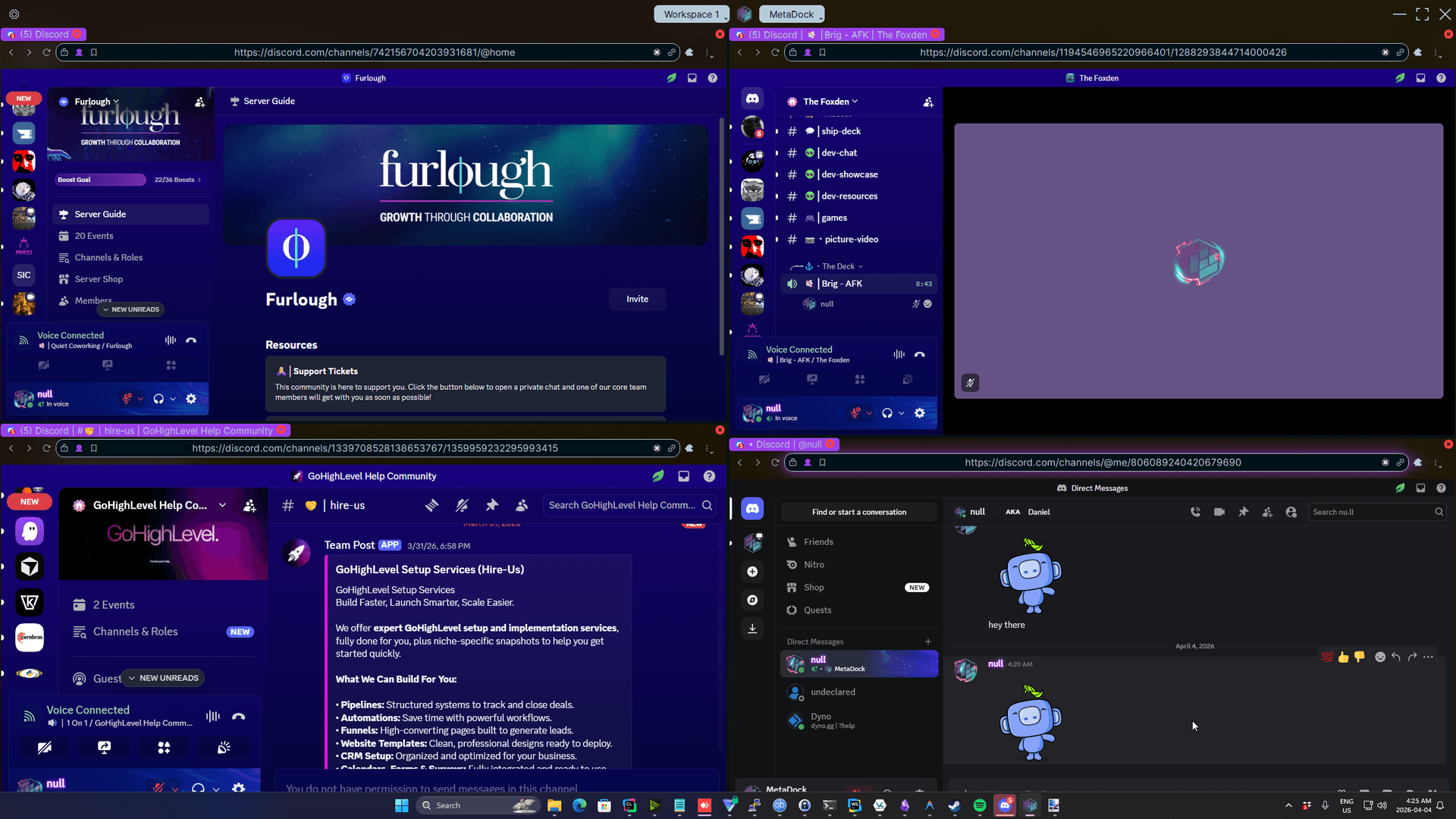
The same browser, your hands
How do I see what my AI browser agent is doing?
Run it in MetaDock. Every browser it opens appears as a panel in your layout, live, and you can click into any one of them while it runs.
Every agent on one screen
Each browser an agent opens is tiled into your layout, so a stuck agent stands out.
No separate takeover mode
The panel the agent drives is an ordinary browser. Click into it, type, scroll, then tell the agent to continue; it reads the page fresh on its next step.
You approve each AI app
Each time MetaDock starts, a new AI app has to ask before it connects: Allow Once (one request), Allow for this session, or Deny. Other sessions of an app you allowed are not asked again until MetaDock restarts, and turning on Allow All Connections skips the prompt. Revoke any app in the API, Automation & AI settings.
Built-in assistant (Beta), same panels
MetaDock's docked AI chat drives your browsers in the same visible panels, through the same tool catalog. Run it on a local model through Ollama or LM Studio with no API key, or bring your own key for a cloud provider.
Why MetaDock
How is this different from a headless or remote browser?
You find out what the agent did after it did it.
The problem
Headless runs you only understand once they have failed.
Session recordings you scrub through after the damage is done.
An agent stuck on a 2FA prompt or a confusing page, with no way for you to help.
Not knowing which of five browsers is the one that went wrong.
| Feature | MetaDock | Headless or remote browser |
|---|---|---|
| Seeing the run | Live, tiled on your own screen | Logs, screenshots, or a hosted live view where offered |
| Stepping in | Click and type in the same panel | Through a live-view link, where offered |
| New AI apps | Each new AI app asks you first, unless you turn on Allow All Connections | Controlled by API keys and the provider's access settings |
| Several agents | Every browser in one tiled layout | One session or tab per agent |
Steam reviews
What people are saying
“Brilliant software. Main use case for me is the ability to resize windows that can't usually be resized. I'm able to do almost as much on 2 monitors now as I could on 3.”
“Very interesting application, great for productivity. This has fast become a tool in my tool box.”
All quotes are from pseudonymous Steam reviewers. Verify on Steam. Reviews curated and re-checked against the live page as of 2026-10-17.
FAQ
Watching and steering agents
Yes. It is an ordinary browser panel. Whatever you change, the agent sees on its next step, because it reads the page as it is then.
Stop it in your MCP client. To cut it off from MetaDock, revoke its app in the API, Automation & AI settings; its next request asks you again, and you can deny it. Closing a browser panel alone does not stop an agent, which can open another.
No. On MetaDock Pro, headless mode runs a browser with no window for jobs you do not need to watch. Visible is the default.
Claude Code, Claude Desktop, Cursor, VS Code, Codex and most other MCP clients that run on your PC, plus the built-in assistant (Beta). 154 tools; the MCP server is on every plan.
You are. MetaDock gives the agent a browser and shows you what it does, but it does not check or block the agent's decisions, and an agent can act faster than you can step in. Use agents only in accounts and on sites whose terms allow automation, and see the EULA for the full terms.
Trial and guarantees
14-day free trial, no signup
Download it and start a 14-day free trial in the app. No account, no email, no card. Then keep Pro or carry on free.
Cancel anytime
Pro renews automatically until you cancel, and you can cancel from the billing portal at any time to stop every future charge.
Local-first data
Multi-monitor layouts, profiles, and browsing data stored locally. No cloud sync.
See every step. Step in on any of them.
Free, with 14 days of MetaDock Pro to start. No account, no email, no card. Windows 10/11.
- 14-day free trial
- No account or email
- No credit card
You may also be interested in...
Other jobs MetaDock does for you and your AI agents
Run several agents at once
Each Claude Code or Cursor session in its own browser profile.
A logged-in browser for your agent
Log in once by hand. The agent works inside the session without your password.
Compare browser MCP servers
MetaDock next to Playwright MCP, Chrome DevTools MCP, Browser Use and cloud browsers.
Claude Code, Claude Desktop, Cursor, VS Code, Codex, Ollama, LM Studio and Windows are trademarks of their respective owners. MetaDock is not affiliated with, sponsored by, or endorsed by any of them. Comparisons reflect publicly available information on the date given and may change.